Surveyor Job Scheduling Software – 2026 Guide
For many surveying firms, job scheduling is a constant source of frustration. Double-booked site visits, travel chaos, and last-minute changes can quickly derail your day and eat into your profits. We cover these issues in more detail in our guide to How to Choose Business Management Software for Surveying Companies. A dedicated surveyor scheduling software is the solution, but choosing the right one is critical.
Consider a common scenario: a surveyor is scheduled for a 9:00 Level 3 Survey in Windsor and a 12:00 valuation in Reading — but nobody accounted for traffic, parking, or travel time. The second appointment runs late, the client is annoyed, and the whole day slips. This is a real-world example of how a lack of a proper scheduling system can directly impact your bottom line.
This guide compares the best surveyor job scheduling software in 2026, from all-in-one practice management platforms like CQ to dedicated field service tools like Jobber and BigChange. We’ll cover pricing, features, and the key differences to help you make an informed decision.
Why Scheduling is a Major Pain Point for Surveyors
Unlike many other professions, surveyors spend a significant amount of their time on the road, traveling between sites. This makes efficient scheduling absolutely critical. A poorly planned schedule can lead to wasted time, increased fuel costs, and unhappy clients. The right scheduling software can help you optimize your routes, minimize travel time, and fit more jobs into your day.
Quick Comparison Table: Best Surveyor Scheduling Software (2026)
| Tool | Best For | Pricing From | Travel Time & Route Optimisation |
| CQ | All-in-one practice management | Custom | Yes |
| Jobber | General field service | $39/month | Yes |
| BigChange | Enterprise field teams | Custom | Yes |
| Survey Booker | UK-specific CRM & booking | £95/month | No |
| JobBook | Simple crew scheduling | Custom | No |
| Kompass BMS | Land surveyor workflow | Custom | No |
| FieldTech | Construction job scheduling | Custom | Yes |
| Any.do | General project management | $5.99/month | No |
| Re-flow | Civil engineering & construction | Custom | Yes |
Best Surveyor Scheduling Software (Shortlist)
•CQ: Best all-in-one for growing firms
•Jobber: Best for general field service
•BigChange: Best for large, multi-team firms
•Survey Booker: Best for automated client booking
•JobBook: Best for simple crew scheduling
•Re-flow: Best for civil engineering & construction
In-Depth Reviews
1. CQ – Best All-In-One for Surveyors
Positioning: CQ is a purpose-built business management software for service businesses with field teams. It’s the ideal choice for surveyors who need a single system to manage everything from leads and quotes to scheduling, site visits, reporting, and invoicing.
Pros & Cons:
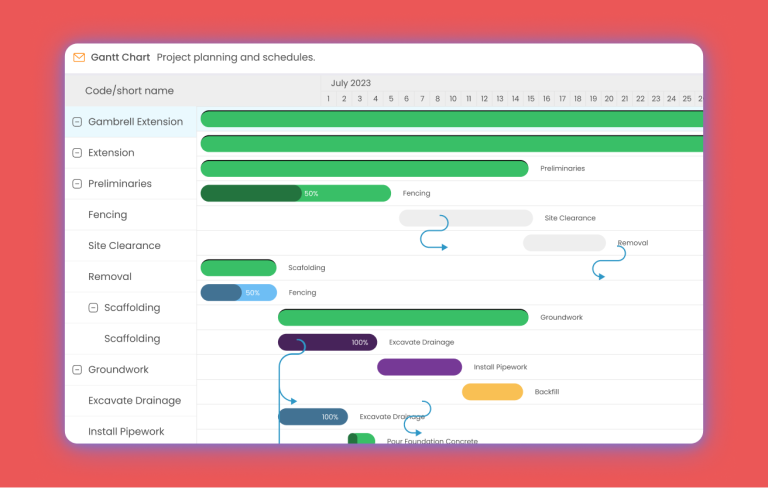
•Pros: All-in-one system, automated scheduling, job sheets & site reporting, supports RICS-style workflows, financial tracking, multi-team clash detection, travel-time aware scheduling, ability to schedule equipment (drones, moisture meters, etc.), drag-and-drop timeline. CQ also supports RICS-style documentation workflows, ensuring your reports, logs, and audit trails stay compliant throughout the job lifecycle.
•Cons: Not a specialist RICS template engine (currently), requires onboarding.
Best For: Growing surveying companies, land surveyors, building surveyors, and multi-team operators who need a single source of truth for their business.
2. Jobber – Best General Field Service Scheduler
Positioning: Jobber is a popular field service platform that’s used by a wide range of businesses, including some surveyors. It’s a good choice for quoting and scheduling, but it lacks the surveyor-specific workflows of tools like CQ.
Pros & Cons:
•Pros: Scheduling & dispatch, quotes, invoices, payments, strong mobile app.
•Cons: No RICS report workflows, no building survey templates, not designed for technical surveying jobs.
Best For: New surveyors who want a simple, affordable field service system to get started.
3. BigChange – Best for Large Multi-Team Firms
Positioning: BigChange is a powerful, all-in-one field service management platform designed for larger businesses with multiple teams. It combines CRM, scheduling, routing, and vehicle tracking in a single system.
Pros & Cons:
•Pros: Advanced scheduling and routing, vehicle tracking, comprehensive job management.
•Cons: More expensive than other options, can be complex to set up, not surveyor-specific.
Best For: Large surveying firms with multiple field teams that need advanced scheduling, routing, and vehicle tracking capabilities.
4. Re-flow – Best for Civil Engineering & Construction
Positioning: Re-flow is a field management software for the construction, civil engineering, and highways sectors. It’s a good choice for firms that work on large, complex projects with multiple teams and strict compliance requirements.
Pros & Cons:
•Pros: Strong compliance features, asset management, dynamic risk assessments.
•Cons: Not designed for building surveyors, more focused on large-scale infrastructure projects.
Best For: Surveying firms that specialize in civil engineering, construction, or highways projects.
Why Google Calendar Isn’t Enough for Surveyors
•No travel time between appointments: Google Calendar doesn’t automatically calculate travel time, making it easy to double-book yourself.
•No equipment allocation: You can’t assign specific equipment to jobs, leading to conflicts and delays.
•No team visibility: It’s difficult to see who’s available and when, making it hard to schedule multi-person jobs.
•No client reminders: You have to manually send reminders to clients, which is time-consuming and error-prone.
•No job sheet or reporting connection: You can’t create job sheets or reports directly from your calendar, leading to more manual work.
Surveyor-Specific Scheduling Buying Guide
When choosing a scheduling software for your surveying firm, look for these key features:
•Drag-and-Drop Calendar: A visual scheduling interface that makes it easy to see who’s available and when.
•Mobile Access: A powerful mobile app that allows your team in the field to access job information, update job statuses, and create reports on the go.
•Equipment Tracking: The ability to assign specialized equipment to specific jobs.
•Travel Time Calculation: A feature that automatically calculates travel time between sites and helps you optimize your routes.
•Client Portal: A portal that allows clients to book and reschedule appointments online.
•RICS Compliance: Your scheduling tool should support RICS-compliant workflows where clear timelines, site logs, and communication records are essential.
Common Scheduling Mistakes Surveyors Make
1.Not Accounting for Travel Time: Scheduling back-to-back jobs too far apart.
2.No Buffer Time: Not leaving gaps for overruns or delays.
3.Using Manual Spreadsheets: Using Excel instead of dedicated software.
4.No Client Self-Service: Forcing all bookings through phone/email.
5.Equipment Conflicts: Double-booking specialized equipment.
The Verdict: Unified vs. Standalone Scheduling
For most growing surveying firms, a unified platform like CQ is the best choice. It gives you a single source of truth for your entire business, from leads and quotes to scheduling, site visits, reporting, and invoicing. This eliminates the need for multiple, disconnected systems and gives you the real-time visibility you need to grow your practice profitably.
If you’re a smaller firm that’s primarily focused on scheduling, a standalone tool like Jobber or JobBook can be a good option. However, as you grow, you’ll likely need to add more systems to manage your projects, finances, and team.
Call to Action
Ready to see how a unified business management platform can transform your surveying practice? Book a demo of CQ today and discover how you can run your entire business in one place or learn more about CQs business management software for architects works.
Frequently Asked Questions (FAQs)
What is the best scheduling software for a small surveying firm?
For a small surveying firm, a tool like Jobber or JobBook can be a good starting point. However, a unified platform like CQ will provide more value in the long run by eliminating the need for multiple systems.
Can I use a generic scheduling tool like Calendly or Google Calendar?
You can, but you’ll miss out on the surveyor-specific features of a dedicated tool, such as equipment tracking and travel time calculation.
What’s the difference between scheduling software and practice management software?
Scheduling software is focused on managing your team’s time and appointments. Practice management software, like CQ, is an all-in-one system that also includes CRM, project management, financial tracking, and more.
How much should I expect to pay for surveyor scheduling software?
Prices vary widely, from free tools like Google Calendar to enterprise systems that cost thousands of pounds per month. A good, all-in-one system for a small to medium-sized firm will typically cost a few hundred pounds per month.
Do I need scheduling software with a mobile app?
Yes, a mobile app is essential for a surveying firm. It allows your team in the field to access job information, update job statuses, and create reports on the go.
What are the benefits of a unified scheduling and job management system?
The main benefit is having a single source of truth for your entire business. This eliminates data silos, improves efficiency, and gives you the real-time visibility you need to make informed decisions.
How long does it take to implement new scheduling software?
Implementation times vary depending on the complexity of the system and the size of your firm. A simple scheduling tool can be set up in a few days, while a more comprehensive system can take several weeks.
What are the most important features to look for in surveyor scheduling software?
The most important features are a drag-and-drop calendar, mobile access, equipment tracking, travel time calculation, and a client portal.